

Many Google accounts. One quiet window.
Stop switching. Start working. Download for Mac Free for 14 daysNo card needed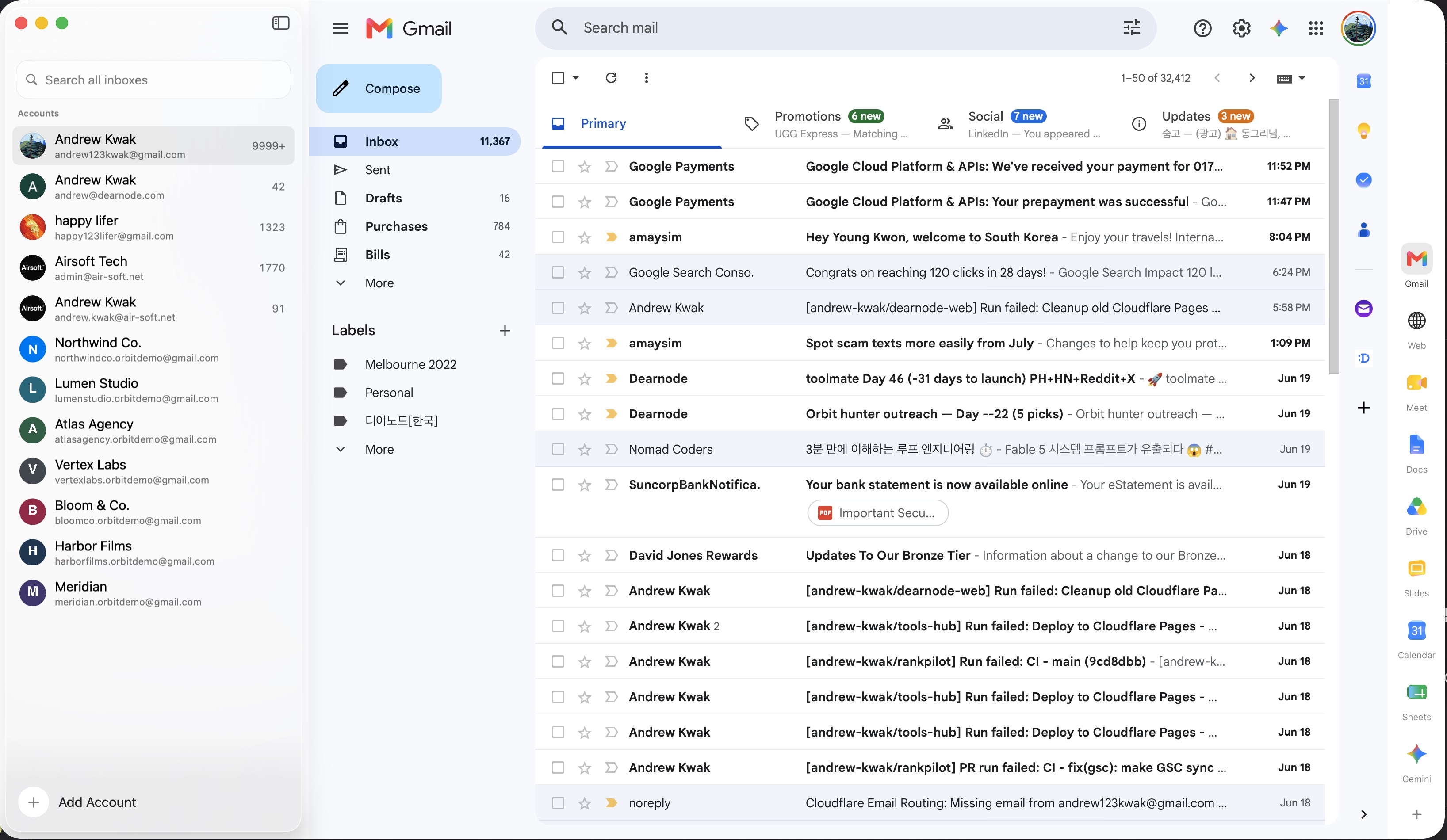
Every account, in its own room


Built for how you actually work
Never the wrong sender
Work, personal, and client accounts stay strangers, so a reply always leaves from the right address.
A real Mac app, not a browser
A 4 MB download that opens instantly. Built with Apple's own tools, so there is no second browser hiding inside. No Chromium, no Electron.

Gmail, Calendar, Drive, Meet, Gemini
Not just mail. Every Google surface opens in the right account context.







Your login stays on your Mac
There is no Orbit account to create and no cloud in the middle. Your sign-ins live on this Mac, so nobody's server outage can sign you out.
- No sync server
- No mail relay
- Keys on this Mac
Private by architecture, not by promise
Orbit has no backend. It is a native Mac app that talks to Google directly, the same way your browser does — each account in its own session, on your machine.
You
→
Cloud server
→
Mail
Your session lives on someone else's backend.
You
↔
This Mac
Nothing to breach, nothing to leak, nothing to sell.
The only one you buy once
Swipe to see all →| Feature |
 Orbit
Orbit
|
 Shift
Shift
|
 Mimestream
|
 Kiwi
Kiwi
|
 Chrome
|
|---|---|---|---|---|---|
| Accounts stay separate | Yes | Multiple accounts | Optional unified inbox | Partial | One window per account |
| Accounts you can add | Unlimited | Plan-based | Unlimited | Up to 9 | Unlimited |
| Price | $89 once | $199/yr | $50/yr | $60/yr | Free |
| You pay | One time | Every year | Every year | Every year | Nothing |
| Private · data stays on your Mac | Yes | Shift account/sync | Yes | Yes | Synced to Google |
| Full Workspace Calendar, Drive, Docs & more |
Yes | Yes | Gmail only | Partial | In tabs |
| Free built-in AI (Gemini) | Yes | Paid tier only | No AI | No AI | Yes |
| Built for Mac, not a wrapped browser | Yes | Electron | Yes | Yes | It's the browser |
Competitor prices as published, July 2026.
From people who bought it
Does exactly what you want it to do. I've been using it for a couple of days. I've tried a ton that didn't work the way I wanted. Orbit feels like it was built just for me.
 Cory Crapes
RAEK ·
Product Hunt review
Cory Crapes
RAEK ·
Product Hunt review
Switching accounts, opening the wrong inbox, constantly checking which profile I'm in. It gets tiring fast. Orbit keeps every account in one clean place.
 Troy Hamthanon
Product Hunt review
Troy Hamthanon
Product Hunt review
Working perfectly. One very happy customer here. I have been desperate for an app like this since Mailplane closed down some years ago.
I don't think I have ever purchased an app or program so fast. It just works for me. Looking forward to whatever you release next.
When I click an email address anywhere, Orbit opens a compose window and asks which account to send from. Arc just opens a blank window.
Pay once. It's yours.
$89one-time
- Every feature, no limits
- Yours forever — no subscription
- Use on 3 Macs
- 14-day free trial
- No card needed
- 30-day money-back guarantee
Requires macOS 14 or later on Apple silicon.
Questions people ask before buying
Is there a real Gmail app for Mac?
Google doesn't make a desktop Gmail app for macOS, so the options are a browser tab, a web wrapper, or a native Mac email client. Orbit is a native macOS app that runs Gmail, Calendar, and Drive for every Google account you add, each in its own window pane. The download is about 4 MB and it does not bundle a copy of Chromium.
How many Gmail accounts can I add?
As many as you want — there is no per-account fee and no seat limit. Each Google account gets its own isolated session, so signing in or out of one account doesn't disturb the others. You switch between them with ⌘1 through ⌘9.
Does Orbit have a unified inbox?
No, and that's deliberate. Orbit keeps each account's inbox separate so a work message never lands next to a personal one and you never reply from the wrong address. If a single merged inbox is what you want, an app like Mimestream is the better fit — we say so plainly in our Mimestream comparison.
Is it a subscription?
No. Orbit is a one-time purchase of $89 for a lifetime licence on your Mac. There is no monthly fee, no per-account pricing, and no renewal. You can try the full app free for 14 days without entering a card.
Does my mail go through your servers?
No. Orbit has no sync server and no mail relay — your Mac talks to Google directly, and your licence key is stored locally. There is no account to create with us and no mailbox of yours sitting on our infrastructure.
What does it need to run?
macOS 14 or later on Apple silicon. Orbit updates itself, and the licence covers the Mac you buy it for.

Guide
How to switch between Gmail accounts, every way ranked
The built-in switcher, the u/0 trick, profiles, and apps.

Multi-account
The best email client for multiple Gmail accounts on Mac
How Orbit, Mimestream, Shift, and Mailbird compare.

Multi-account
Why you can't run 9 Gmail accounts in Chrome
Profiles, containers, and the one-window fix.